An activity diary and mood tracker in one, built on the hourly activity record used in cognitive behavioral therapy. Each hour, jot down what you were doing and rate one feeling you choose to follow. After a few days, you start to see which hours lift you and which wear you down.
Free. No account. What you log stays on your device, or in your own iCloud or Google Drive if you turn on sync.
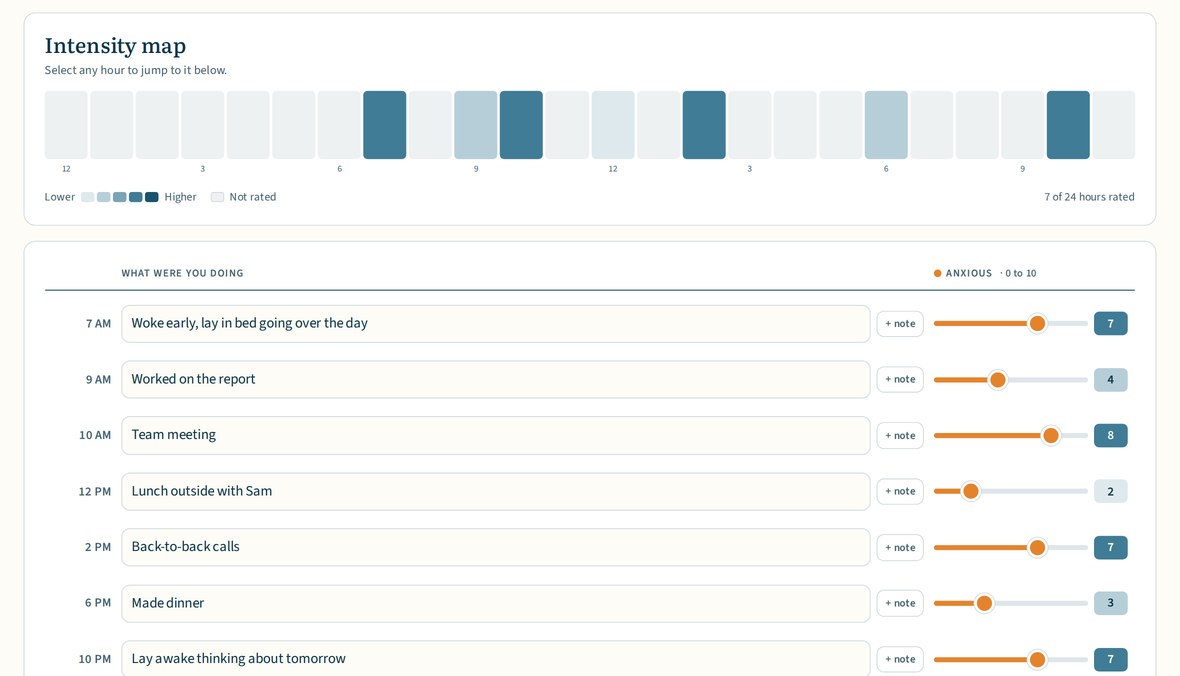
| Hour | What I was doing | Anxious |
|---|---|---|
| 7 AM | Woke early, lay in bed going over the day | 7 |
| 9 AM | Worked on the report | 4 |
| 10 AM | Team meeting | 8 |
| 12 PM | Lunch outside with Sam | 2 |
| 2 PM | Back-to-back calls | 7 |
| 6 PM | Made dinner | 3 |
| 10 PM | Lay awake thinking about tomorrow | 7 |
One feeling followed, rated 0 to 10.
- In your browserThe full record, with an intensity map and plain observations. It saves in this browser.
- On paperA day or a week per sheet, printable or fillable, in English and Spanish.
- On your phoneReminders, a widget, a lock, and private sync. Free on iPhone, iPad, and Android.
How it works
Each hour, write a few words about what you were doing. Morning walk, team meeting, dinner with a friend. The app remembers what you type, so an activity you log often is one tap the next time.
Then rate one feeling for that hour. Pick the feeling you most want to understand, like stressed or content, and rate how strong it was from 0 to 100, or 0 to 10 if you would rather. You can add other feelings for an hour too, but one is enough.
Once you have rated about eight hours over a few days, Patterns starts describing which activities, times of day, and days of the week tend to go with higher or lower ratings, in plain sentences. After a week or two, those patterns are worth a closer look.
Try a day in your browser
The worksheet on this site works the way the app does. Choose a feeling to follow, from a wheel of common feelings or in your own words, then note each hour and rate how strong that feeling was. The intensity map fills in as you go, and nothing you type leaves your browser.
Rate an hour on more than one thing
A feeling is one way to describe an hour. Two more are worth having, and you can turn either on whenever you like, in the app and on the worksheet.
Pleasure is how much fun, joy, or satisfaction you got from the hour. Mastery is your sense of achievement in it: feeling capable, having made progress, or being in control. Plenty of hours score low on one and high on the other, and the difference is usually the interesting part. Each gets its own intensity map and its own observations, and turning one on or off never changes ratings you have already saved.
Both ratings go back to the activity chart in Aaron Beck and colleagues’ 1979 manual, Cognitive Therapy of Depression. More on pleasure and mastery.
The app
The same record, with reminders, a widget, a lock, and private sync across your devices. Features marked app are only in the app. Everything else also works in the browser worksheet.




- Intensity map
- A colored grid of hours by day shows where a feeling ran high or low at a glance. Tap any square to open that hour.
- Written observations
- Short written observations, not scores or verdicts. Which mornings tended to feel calmer, which activities showed up alongside tougher hours.
- Reminders app
- Set up to twelve daily reminders. A reminder can open straight to the current hour, ready to log.
- Widget app
- A widget shows today’s count and opens the current hour with a single tap. On iPhone and iPad, it goes on the Home Screen or Lock Screen, and on iOS 18 you can add Log this hour to Control Center or the Action button. On Android, there is a home screen widget, a Quick Settings tile, and a shortcut on the app icon.
- Export
- Export a formatted PDF, a CSV spreadsheet, or a full backup you can restore later or carry to a new device.
- Storage and sync app
- The app keeps your record in its own storage, so it is not at the mercy of the browser cleanup that can wipe a worksheet after a week away. Turn on sync and it stays current across your devices, through iCloud on Apple devices or Google Drive on Android.
- Hours you are awake app
- If you are never awake at 4 AM, say so, and the day gets shorter to scroll. Any hour you have logged something in still shows, even outside those times, so the setting can never hide your own writing.
- A 0 to 10 scale
- Ratings run 0 to 100 by default. If that is more precision than you want, switch to 0 to 10 in the app’s Settings or with the Scale control on the worksheet. Nothing you have already rated changes.
- No account
- There is nothing to sign up for, and no server of ours ever holds your record. It lives on your device. If you turn sync on, it also lives in your own iCloud or Google Drive, which we cannot see.
- Lock app
- Keep your record for your eyes only with an optional lock. Face ID, Touch ID, or passcode on Apple devices, and fingerprint, face, PIN, or pattern on Android.
- English and Spanish
- Switch the whole app, including the widget, between English and Spanish anytime, separate from your device language. The browser worksheet and the printable sheets come in both languages too.
Where this comes from
Writing down what you did each hour and how it felt is one of the oldest techniques in cognitive behavioral therapy. Aaron Beck and his colleagues included it in their 1979 treatment manual for depression. Its purpose is to show how your days actually go and how what you do connects with how you feel. It is also where behavioral activation, a fuller treatment that has done well in clinical trials, usually begins. Learn explains the method in plain language, Research summarizes the evidence with full references, and there are printable sheets for keeping it on paper. Therapists can find notes on using it with clients on the For therapists page.
Activity Record itself is a personal record. It gives no advice, makes no diagnosis, and is not a substitute for care from a professional. The sentences in Patterns only describe what you have logged, in plain language, and leave the meaning to you.
Common questions
What is the difference between the app and the worksheet on this site?
The worksheet is a full activity record you can fill in right in your browser, with nothing to install, and it is the quickest way to see whether this suits you. The app records the same things and adds reminders, a widget, a lock, private sync, and storage your browser cannot clear. Nothing syncs between them automatically, but a backup file moves a record either way.
Is there an Android version?
Yes. Activity Record is on Google Play and on the App Store, and they are the same app, with the same logging, observations, and exports in English and Spanish. The main difference is which service optional sync uses, iCloud on Apple devices and your own Google Drive on Android. The widgets and lock options also follow each platform.
Is this the same as a CBT activity diary?
Yes. A CBT activity diary, also called an activity record, activity log, or activity monitoring form, asks you to write down what you did each hour and rate it, and many versions add pleasure and mastery. Activity Record keeps that hourly structure, lets you choose the feeling you rate, and offers pleasure and mastery as options. It is for recording how your days go, not for planning activities, and you can keep it on your own or alongside therapy. How to keep an activity diary walks through it with an example day.
Can I print it?
Yes. There are free printable sheets for one day or one week, with the same core columns as the app, rated 0 to 100 or 0 to 10, in English and Spanish. The worksheet and the app can also export a filled-in record as a PDF.
Can therapists use it with clients?
Yes, and nothing a client records is sent to us. Clients can keep it on paper, in the browser, or in the app, then share a PDF. The For therapists page covers setup, exports, and privacy.
Where is my data stored?
In the app, on your device, and in your own private iCloud or Google Drive storage if you turn sync on. On the worksheet, in the browser you are using and nowhere else. Either way we never see it, and no server of ours ever holds it. See the app privacy policy or the website privacy policy.
Can I change the feeling I follow?
Yes. In the app, open Settings and tap Change the feeling. On the worksheet, use the feeling button near the top. Ratings you already saved keep the feeling they were rated under, so you can switch anytime without losing history. There is no preset feeling in either the app or the worksheet: you choose or write your own before you start.
How do reminders work?
In the app, you can set up to twelve daily reminders in Settings. They are scheduled on your device, and tapping one can open the current hour ready to log. The browser worksheet cannot send reminders, because a web page stops running once you close the tab.
What can I export?
From both: a formatted PDF, a CSV spreadsheet, and a full backup file you can restore later, on the same device or another one. The worksheet can also save a day’s intensity map as an image.